Most learning management system (LMS) implementations don’t fail because of bad technology, they fail because of poor planning, underestimated content work, and teams that weren’t set up for success from day one. This leads to delays, budget overruns, and a platform that employees quietly ignore.
At HQSoftware, we’ve seen this pattern often enough to know exactly where things go wrong and how to prevent it. We’ve built and implemented learning platforms used by 50,000+ users across 40+ countries, from banks and manufacturers to consulting firms. One of our clients, a Danish e-learning company, achieved 3x faster training development after we helped them rethink their entire LMS architecture and UX.
This guide gives you a practical, step-by-step checklist built on that real-world experience. We’ll share insights gained from years of developing and implementing different learning platforms for organizations of all sizes. You’ll discover how to assemble the right team, set realistic timelines, prepare your content, and ensure user adoption. Our expertise will help you anticipate potential roadblocks before they become problems.
An LMS implementation checklist is essential because it keeps the project organized and ensures nothing important gets overlooked. Without a structured guide, it’s easy to miss critical steps or encounter technical problems that could have been prevented.
A checklist helps to:
coordinate tasks across different teams;
track progress at each phase;
maintain accountability throughout the process.
By following a comprehensive checklist, you’ll avoid costly mistakes and increase your chances of launching the LMS successfully on schedule and within budget.
Curious what a well-implemented LMS looks like in practice?
Browse our portfolio to see the platforms we’ve built and the problems they solved.
LMS implementation typically takes from a few weeks to several months to complete, depending on the system’s complexity and organizational size. A simple cloud-based solution for a small team might be ready in 4-8 weeks, while an enterprise system with extensive customization could take 6-12 months or longer.
Factors that influence duration include:
the number of integrations needed;
amount of existing content to migrate;
level of customization required;
the speed at which stakeholders can make decisions;
feedback throughout the process.
So, implementing an LMS can be tricky, which is why HQSoftware offers expert guidance throughout the entire process.
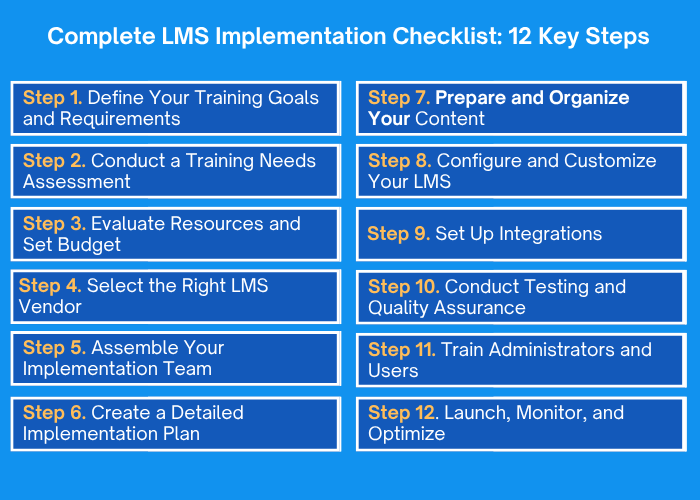
Drawing on our proven expertise, we apply 12 key LMS implementation stepsto maximize user engagement and platform efficiency.
Step 1. Define Your Training Goals and Requirements
Before diving into technical decisions, it’s important to establish clear training goals that align with your organization’s broader objectives. Start by identifying what you want to achieve with your LMS, whether it’s improving employee onboarding, ensuring compliance, developing new skills, or enhancing customer education.
Key actions at this stage:
document the specific outcomes you expect from the system,
engage stakeholders from various departments to understand their unique training needs,
create a shared vision that guides all subsequent decisions.
Step 2. Conduct a Training-Needs Assessment
A thorough assessment of your training needs will reveal the gap between your current training capabilities and what you need to achieve your goals. Analyze your existing training programs to identify what’s working and what needs improvement. Talk to employees, managers, and other end users to understand their learning preferences and expectations.
Review current training materials to determine what content you already have and what needs to be created or updated. This assessment also helps you understand technical requirements such as:
the number of users;
types of content formats you’ll need,
any special features that would enhance learning effectiveness in your organization.
Step 3. Evaluate Resources and Set Budget
Underestimating your LMS budget is one of the most common reasons projects stall halfway through. Consider all costs beyond the software license, including:
implementation services;
content development;
data migration;
integrations;
training;
and ongoing support.
Assess your internal resources to determine what expertise you have in-house and where you’ll need external help. Factor in both one-time implementation costs and recurring expenses such as annual subscriptions, maintenance, and future upgrades. Remember that choosing the cheapest option isn’t always wise if it lacks essential features or requires extensive customization later.
Not sure how to scope your LMS budget?
Most vendors won’t tell you about hidden costs upfront — we will.
So you can plan with confidence from the start.
Research potential vendors thoroughly, looking beyond marketing materials to understand their track record, customer reviews, and industry expertise. Request demonstrations that showcase features relevant to your specific needs rather than generic presentations.
When evaluating HQSoftware, you won’t get a generic demo. We map our walkthrough to your specific goals, share relevant case studies, and give you transparent pricing with no hidden setup fees. After launch, a dedicated project manager stays with you because that’s when the real optimization work begins.
Step 5. Assemble Your Implementation Team
A successful LMS implementation requires contributions from diverse roles. Key team members include:
Project manager — coordinates all activities, maintains timelines, and serves as the central communication point,
IT professionals — handle system configuration and integrations,
Instructional designers — develop and organize learning content.
HQSoftware offers flexible team augmentation to strengthen your implementation efforts. If you lack a dedicated project manager, our experienced leads can take the helm. Need technical expertise for complex integrations? Do you lack instructional design capabilities? Our learning experts have you covered. We complement your internal resources with exactly the skills you need, ensuring your implementation team has the right mix of talent without the overhead costs involved in making permanent hires.
Step 6. Create a Detailed Implementation Plan
A comprehensive LMS implementation plan is your roadmap from selection to launch and beyond. It should include:
distinct phases with specific milestones and deadlines,
clear task ownership so everyone knows their responsibilities,
communication strategies to keep all stakeholders informed,
risk management approaches for handling potential problems,
success criteria for measuring progress at each phase.
HQSoftware’s specialists create detailed, realistic implementation plans based on proven project management methodologies and our extensive experience with LMS deployments. We map out every phase with precise timelines. Our project managers give regular updates, handle risks early, and adjust plans as needed to keep your LMS implementation on time and within budget.
Step 7. Prepare and Organize Your Content
Content preparation is often more time-consuming than organizations anticipate, so starting early is essential. Begin by inventorying all existing training materials, including documents, presentations, videos, and assessments currently used across your organization. Evaluate each piece of content to determine what’s still relevant, what needs updating, and what should be retired.
Organize content into logical categories that match how users will search for and consume learning materials. Convert materials into formats compatible with your new LMS, ensuring they meet accessibility standards for all learners. Develop a content strategy that includes creating new courses to fill identified gaps.
Step 8. Configure and Customize Your LMS
System configuration involves setting up your LMS to reflect your organization’s structure, branding, and specific requirements. Start by mapping out your company hierarchy, assigning user roles and permissions, and defining the training paths each group must follow.
Key configuration areas include:
Branding — logo, colors, and visual identity
Notifications — deadlines, new assignments, course completions
Reporting dashboards — metrics for administrators and managers
Enrollment and certification — automated workflows that match your training operations
For one client, the HQSoftware team built granular dashboards that gave line managers real-time visibility into team KPIs — and connected those insights directly to personalized training paths. That’s the difference between a configured LMS and one that’s actually built around how your business works.
Step 9. Set Up Integrations
Integrations connect your LMS with other business systems to create seamless workflows and eliminate duplicate data entry. Begin by prioritizing which integrations are essential for launch versus nice-to-have additions you can implement later. Common critical integrations include single sign-on (SSO) so users access the LMS with their existing credentials, HR information systems (HRIS) to automatically sync employee data and organizational changes, and video conferencing platforms for virtual instructor-led training.
Depending on your needs, you might also integrate with CRM systems for customer training, content authoring tools for course development, or analytics platforms for advanced reporting. Work closely with the LMS vendor to ensure integrations are configured correctly, test data flows between systems thoroughly, and establish processes for ongoing synchronization.
Standard connectors don’t always cut it. When our Danish client needed to merge learning management with performance management into a single cycle, we built a custom integration that let managers identify skill gaps, assign targeted courses, and measure training impact — all within one platform.
Step 10. Conduct Testing and Quality Assurance
Thorough testing before launch helps you identify and fix issues when stakes are low. Cover all key areas:
Technical testing — verify system functions, integration data flows, and performance under load;
User acceptance testing — have real users navigate the system and perform typical tasks;
Cross-device testing — ensure the experience works on different devices, browsers, and operating systems;
Content review — confirm all migrated materials display correctly and interactive elements function as intended.
At HQSoftware, we document every bug discovered, prioritize by severity, and resolve all issues before launch.
Step 11. Train Administrators and Users
Effective training ensures your team can manage the system and your users know how to access learning resources. Begin by training system administrators on technical aspects such as:
user management,
course creation,
running reports, and
troubleshooting common issues.
Train course creators and instructional designers on content development tools, uploading materials, and building engaging learning experiences.
Consider offering multiple training formats like live sessions, recorded tutorials, quick reference guides, and FAQs to accommodate different learning preferences. Focus on what users need to know immediately and provide ongoing learning opportunities for advanced capabilities as they become more comfortable with the platform.
Step 12. Launch, Monitor, and Optimize
A successful launch is not a single event, it’s a process. Begin with a pilot group of selected users before opening the platform to everyone. This controlled rollout lets you catch usability issues, fix technical problems, and refine the experience while the stakes are still low.
Before the full launch, communicate clearly with your users: what the new system is, why it’s being introduced, what they’ll need to do, and where to get help if something goes wrong. Employees who understand the purpose of the LMS are far more likely to engage with it.
Once live, monitor actively:
track completion rates, login frequency, and support requests in the first weeks,
collect structured feedback through short surveys and informal conversations,
use what you learn to make continuous improvements to content, navigation, and settings. An LMS is not a set-and-forget tool. The organizations that get the most value from their platforms are those that treat launch as the beginning of an ongoing improvement cycle, not the finish line.
Prefer to skip the research and talk to an expert?
If you already know you need help with LMS implementation, let’s jump straight to your specific situation.
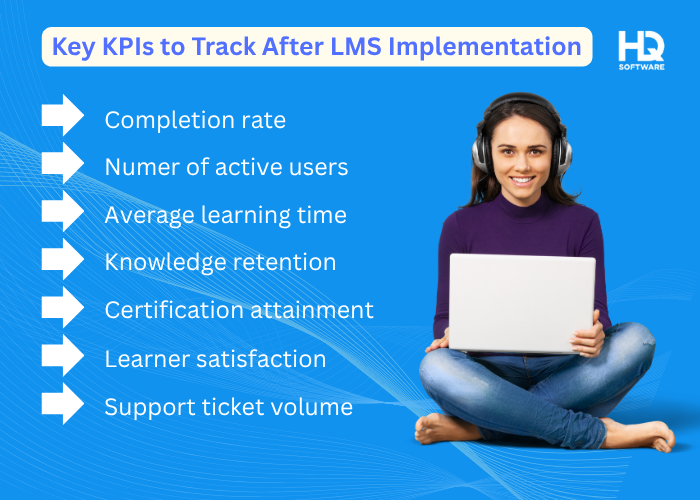
Below is the list of the most important KPIs to track after LMS implementation, in our view:
Completion rate: the percentage of assigned courses that users finish. A higher rate shows people are engaging and finishing what’s required.
Number of active users: number of unique learners logging in each month. Steady or growing numbers indicate that the platform remains relevant.
Average learning time: how many minutes, on average, users spend on a course. This helps you spot overly long or too‑short modules.
Knowledge retention: Scores on quizzes or assessments taken after the training. Improvements suggest whether the content is effective.
Certification attainment: the share of employees who earn required certifications. This reflects compliance and skill‑building.
Learner satisfaction: post‑course survey ratings; satisfied users are more likely to continue using the system.
Support ticket volume: how many technical or usability issues are reported. A drop over time means the system is becoming more intuitive.
Regular KPI tracking helps you notice patterns and improve your platform. While these metrics reveal problems after they occur, being aware of typical mistakes helps you stop them before they ever affect your numbers.
Common LMS Implementation Mistakes to Avoid
We see the same problems happen over and over—many learners resist the new system and quit courses halfway through. But knowing what can go wrong helps you avoid these issues and build something people genuinely want to use.
Skipping the Planning Phase
One of the biggest mistakes organizations make is rushing into LMS implementation without adequate planning. When you skip the important steps of defining clear goals or documenting requirements, you end up with a system that doesn’t actually solve your training challenges.
Some teams get excited about new technology and want to move quickly, but this impatience often leads to costly rework later. Time spent on careful planning may seem to draw out the process, but it actually speeds up the whole rollout and helps you avoid costly mistakes later.
Making Price Your Only Decision Factor
Selecting an LMS solely because it’s the cheapest option is a recipe for disappointment and hidden costs. While budget constraints are real, the least expensive platform often lacks essential features, requires extensive customization, or comes with poor support that frustrates your organization.
The right approach balances spending with value, considering overall costof ownership including implementation, maintenance, and potential scalability needs. Sometimes paying a bit more upfront for a robust solution with excellent support saves significantly in the long run.
Underestimating Content Preparation Time
Organizations frequently underestimate how long it takes to prepare and organize training content for a new LMS. They assume uploading existing materials will be quick and easy but then find out that everything needs work. Videos require compression, documents need accessibility improvements, and outdated courses need updates before they fit the new platform.
When content development is rushed, learners face broken links, missing resources, and poor quality. To sidestep these problems, begin your content preparation early in the project timeline, dedicate sufficient time to get it right, and take a phased launch approach that prioritizes quality over speed.
Overlooking Integration Requirements
Without connecting to your HRIS, you need to manually update user information, causing errors and extra work. Without SSO, people have to manage yet another login. Missing CRM integration keeps customer training data separated from everything else.
Decide which integrations matter during planning, not afterward, when adding them costs more and takes longer. Make an LMS integration checklist and coordinate with your LMS development vendor to ensure systems connect properly from the start.
Failing to Measure and Iterate
Launching your LMS and never checking how well it’s working is a big mistake. Some companies set it up, mark it as done, and never look back to see if it’s actually helping them reach their goals.
Without measuring KPI, you can’t tell if you’re getting value from your LMS or where to focus improvements. Pick your metrics before launching, track them consistently, and use them to guide ongoing enhancements. Let your LMS evolve with your organization instead of leaving it unchanged.
LMS Implementation Best Practices for 2026
Now we’ll show how to dodge those mistakes and create a stronger, easier‑to‑use LMS. Follow these tips and today’s hurdles become tomorrow’s wins.
Start With a User-Centered Design Approach
The best LMS rollouts in 2026 start with people, not technology. From day one, bring learners, teachers and administrators into the conversation so you really understand how they work and study. Before you lock in the look and feel, try out a few interface options with real users and keep the design that works best for them.
When the LMS matches everyday habits instead of forcing a new workflow, people adopt it faster and with less hassle. Good user‑centered design makes the system feel simple, saves time and keeps everyone from feeling overloaded.
Embrace Mobile-First Learning
People want to access training on phones and tablets, whether they’re working remotely, traveling, or learning during breaks. Make sure your LMS works well on mobile with designs that adapt to different screen sizes. Ensure videos, documents, and quizzes are easy to use with touch controls.
Since many people have limited data or spotty internet, allow offline access when you can. Mobile-first also means creating short, focused lessons that fit busy schedules instead of hour-long sessions at a desk.
Implement AI and Personalization Features
Artificial Intelligence (AI) is changing how learning platforms work in 2026, and smart organizations use these tools. AI suggests relevant courses based on someone’s job, past training, and career goals, helping people find what they need faster.
Learning paths adjust to each person—giving extra help where they struggle and moving quickly through what they already know. Chatbots answer common questions instantly, lightening the load on support teams. Automated reports spot trends and problems that would take hours to find manually. You don’t need all AI features right away, but adding them thoughtfully makes your LMS smarter over time.
Focus on Microlearning and Flexible Formats
Long courses are fading out. Learners prefer short, 5- to 10-minute segments they can fit into busy schedules. Break topics into small modules focusing on one thing at a time. Provide videos, podcasts, infographics, and interactive practice in different combinations. This lets people learn in ways that work for them. Bite-sized content also helps people remember more, because they apply it immediately rather than struggling to recall a long session.
Use Data Analytics for Continuous Improvement
Successful companies use learning data analytics to drive continuous improvement. Look beyond completion numbers to understand engagement. Which courses lose learners partway through? Where do people get stuck? What learning patterns connect to better job results?
Let data guide your decisions about content, system updates, and training approach. Show stakeholders what you’re learning, to demonstrate impact and discover opportunities. Review analytics routinely, spot what needs work, and make actual changes as needed rather than just hoarding data.
Plan for Scalability From Day One
Your LMS needs to scale as your organization grows. Pick a platform that manages more users and content without getting slow or crashing. Think about tomorrow’s needs. Will you need training for external users, support for multiple languages, or to generate revenue from courses?
Scalability doesn’t require implementing everything upfront, just choosing adaptable solutions. Consider technical aspects such as processing power and practical aspects like management systems that work whether you have 100 or 10,000 users.
These aren’t abstract recommendations — they’re principles we’ve applied in real projects. Our eLearning platform for a Danish client checks every box on this list: it’s mobile-ready, uses personalized learning paths tied to individual KPIs, supports A/B testing of course content across employee groups.
That’s what a future-ready LMS looks like in practice.
Final Thought
Successful LMS implementation isn’t just a technical project — it’s a business initiative. And like any business initiative, it succeeds or fails based on how well it’s planned and executed.
HQSoftware has guided organizations from various industries through every stage of this process — from defining goals to post-launch optimization. Whether you need a full implementation partner or expert support for a specific phase, we’ll help you launch faster, avoid costly mistakes, and build a platform your people actually use.
An experienced software developer specializing in IoT and AI-driven technologies. Having contributed to more than 20 IoT projects, shares practical expertise and insights on connected software development, AI integration, and intelligent solutions.
The implementation time varies widely, but a typical LMS rollout takes 2‑6 months. Simple deployments may finish in weeks, while complex integrations, data migrations, and custom workflows often require several months. The timeline depends on multiple factors, including scope, resources, and stakeholder involvement.
What Is the Average Cost of LMS Implementation?
LMS implementation costs vary significantly based on multiple factors rather than following a fixed price structure. The total investment depends on system type, with cloud-based solutions typically requiring lower upfront costs than on-premises installations. Organization size influences pricing, as does the level of customization needed. Additional factors include integration complexity, user count, and ongoing support requirements.
What Are the Most Important Features for an LMS?
A key LMS features checklist will include:
intuitive course authoring;
mobile accessibility;
robust analytics;
social learning tools;
certification tracking;
gamification;
multi‑language support;
seamless integrations with HR or CRM;
scalability;
strong security, and
flexible deployment options that adapt to diverse learning needs.
Should I Choose a Cloud-Based or On-Premises LMS?
A cloud-based LMS works best when you need quick deployment with scalable infrastructure and minimal upfront costs. Remote accessibility is a natural advantage of cloud hosting. On-premises solutions become essential when data control requirements are stringent or when your organization needs custom integrations that cloud platforms don’t support. Offline functionality may also require an on-premises approach. Your decision should ultimately reflect strategic alignment with data residency needs.
What Integrations Are Essential for LMS?
Essential LMS integrations include:
HRIS/HRMS for employee records;
CRM for sales‑learning alignment;
SSO and identity management for secure access;
payment gateways for eCommerce;
video‑conferencing tools for live sessions;
analytics platforms for reporting;
content‑authoring suites for custom modules;
and certification databases to validate qualifications and verification to support global teams effectively.
What Team Members Should Be Involved in Implementation?
A successful LMS implementation requires diverse expertise across your organization. The project manager coordinates overall execution, while IT staff handle technical LMS setup. Instructional designers develop engaging content, and HR representatives ensure user requirements are met. Department heads provide stakeholder input, supported by end-user representatives who offer practical feedback. Executive sponsors maintain strategic alignment throughout the process.
We are open to seeing your business needs and determining the best solution. Complete this form, and receive a free personalized proposal from your dedicated manager.
Sergei Vardomatski
Founder
We use cookies to analyze traffic, personalize site content, and for social media features. We share this
data with our ad and social media partners. You can change your cookie settings and learn more
here. By browsing the website you consent to our rules.