Table of contents:
How Does AI Work in Customer Support?
What Are the Benefits of AI in Customer Service?
What Are Some Prime Examples of AI in Customer Service?
What Are the Challenges of Implementing AI in Customer Service?


Every time a customer messages a support chat and receives an instant, accurate response at 3 a.m., Artificial Intelligence (AI) is what makes it possible. Today, AI in customer support is no longer a futuristic concept but a real-world tool that is already transforming how companies interact with their customers.
According to Gartner, by 2027, AI-powered chatbots will become the primary customer service channel for about a quarter of organizations. And this is no surprise: AI allows companies to handle thousands of inquiries simultaneously, reduce the workload on agents, and increase user satisfaction at the same time.
But how exactly does AI work in customer service? What tasks does it handle best? And what challenges will you face during implementation? At HQSoftware, we have helped businesses build and deploy AI-powered support solutions across industries. In this guide, we share what we have learned — from technologies and real-world use cases to a step-by-step implementation guide.
How Does AI Work in Customer Support?
What Are the Benefits of AI in Customer Service?
What Are Some Prime Examples of AI in Customer Service?
What Are the Challenges of Implementing AI in Customer Service?
AI in customer support works by combining Natural Language Processing (NLP), Machine Learning (ML), and speech analysis to understand customer requests, automate routine tasks, and continuously improve response accuracy over time.
To understand this in more detail, let’s look at the core technologies that power modern AI support solutions.

In practice, AI-powered customer support is used in several key areas:
It’s important to understand that AI-powered customer service does not completely replace humans. It handles predictable, repetitive tasks, freeing up agents to handle complex, emotionally charged situations where human involvement is indispensable.

Want to see how AI in customer support works in practice?
We have compiled real AI implementation cases with concrete metrics and outcomes. Explore our projects and find a solution similar to your business challenge.
AI in customer service reduces response times, cuts operational costs, and can boost customer satisfaction. But most importantly, it enables a small team to handle a volume of inquiries that previously would have required significantly more resources. Here are the specific benefits businesses gain in practice.
Customers don’t like to wait. According to a HubSpot study, 90% of consumers consider an immediate response to be “important” or “very important” when contacting customer support. AI-powered customer service solves this problem in a radical way: chatbots and virtual assistants process requests instantly, without queues or wait times on the line.
For businesses, this means not only increased customer satisfaction but also a direct impact on conversion. Studies show that companies that respond to inquiries within the first minute close deals 7 times more often than those that respond an hour later.
One of the most common questions asked by executives is: “How can we provide support outside of business hours without expanding our staff?” The answer is AI-powered customer support.
Unlike human agents, AI works around the clock, without days off, holidays, or sick leave. This is especially critical for companies with an international audience, where customers are located in different time zones. Instead of hiring separate teams for each region, businesses get a single solution with global coverage and consistent response quality at any time.
Is implementing AI worth the investment? The numbers speak for themselves. According to IBM, the average cost of a single interaction via an AI chatbot is $0.50, whereas a call to a live agent costs a company $6.00.
At the same time, AI-powered customer service doesn’t require replacing the entire team. It handles routine, repetitive requests (order status, standard questions, data updates) and frees up agents for complex cases where a human touch is truly needed. As a result, the same team can handle a significantly larger volume of work without a proportional increase in costs.
Modern AI systems in customer service analyze purchase history, previous interactions, and dozens of other metrics to create a personalized experience for each customer. What once required the manual effort of a key account manager can now be scaled across the entire customer base. Customers receive relevant recommendations, personalized greetings, and context-aware responses.
AI not only interacts with customers directly but also helps human agents work more efficiently. AI-powered systems provide real-time suggestions for relevant responses, automatically pull up the customer’s history, and recommend articles from the knowledge base. As a result, agents spend less time searching for information and more time resolving issues effectively.
AI in customer service is used in a variety of ways — from chatbots that handle routine inquiries to voice assistants that manage appointments around the clock. Below are some examples of the ways AI-powered customer support is making the greatest impact.
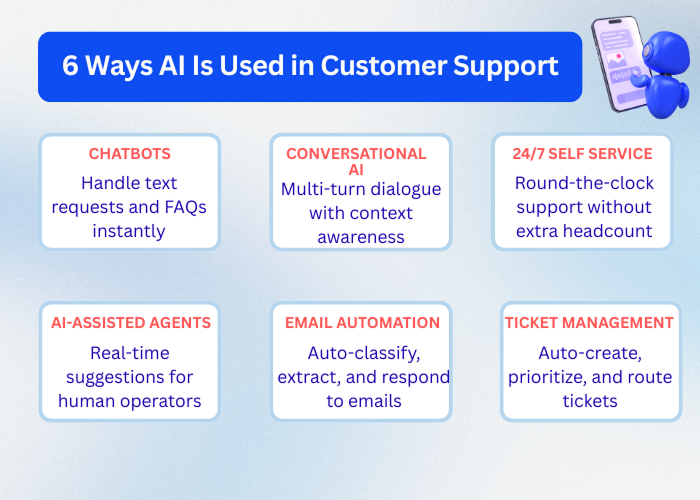
Chatbots are the most recognizable example of using AI in customer service. They process incoming text requests, answer common questions, help with website navigation, and direct customers to the right resources — all without the need for a live agent.
Modern AI chatbots differ significantly from the scripted solutions of the previous generation. They understand natural language, maintain context within a conversation, and can correctly transfer the conversation to a human when a query goes beyond their scope of expertise.
A real-world example from HQSoftware: Our team developed an AI chatbot for a medical clinic in the U.S. It automated appointment scheduling, onboarding of new patients, and handling of routine inquiries. As a result, the speed of handling inquiries increased fourfold, the volume of incoming calls decreased by 35%, and the clinic’s operating costs dropped by 25%.
While chatbots primarily operate based on predefined scripts, conversational AI takes things to the next level. These systems are capable of engaging in full-fledged, multi-turn conversations, adapting to the context of the conversation, and handling complex, non-standard requests.
Conversational AI is built on LLMs and Natural Language Understanding (NLU) technologies. This allows the system to do more than just recognize keywords; it can truly understand the user’s intent even if it is phrased vaguely or changes during the conversation.
A real-world example from HQSoftware: For a multidisciplinary medical center, the HQSoftware team implemented a voice-based AI assistant using NLU and the RAG approach. The system recognizes the patient’s speech in real time, determines their intent, retrieves relevant data from the center’s knowledge base, and generates an accurate response. As a result, 60–70% of routine calls are handled automatically, and the speed of appointment scheduling has doubled.
Customers expect assistance not only during business hours. AI-powered customer support makes self-service available around the clock, without the need to expand staff or schedule night shifts.
AI-powered self-service portals allow customers to find answers on their own, manage their accounts, track orders, and resolve common issues at any time that’s convenient for them. At the same time, the system continuously learns from new queries, becoming more accurate with every interaction.
AI in customer support doesn’t always interact directly with the customer. One of the most effective scenarios is providing real-time support to human agents. While the agent is handling the conversation, AI simultaneously analyzes the context and suggests relevant responses, knowledge base articles, and next steps.
This approach is particularly valuable during the onboarding of new employees: instead of months of training, a new agent receives AI prompts from day one that help them respond with the same confidence as an experienced colleague.
Email remains one of the primary channels for customer support and is one of the most labor-intensive for the team. AI-powered customer service automates the processing of incoming emails: it classifies inquiries, extracts key information, and generates personalized responses to common requests.
At the same time, the system can distinguish between simple inquiries that can be resolved automatically and complex cases that require the attention of a live specialist. As a result, the support team receives only those emails where their involvement is truly necessary.
Creating and assigning tickets manually is a source of errors, delays, and data loss, especially when there is a high volume of inquiries. Using AI in customer support automates the entire process: it extracts key information from the inquiry, categorizes the issue, assigns a priority, and instantly routes the ticket to the most suitable agent or department, taking into account their workload and specialization.

Not sure which AI solution is the right fit for your business?
We’ll help you figure it out, with no strings attached and no technical jargon. Get in touch and we’ll analyze your situation and suggest the best approach, free of charge.
Dmitry Tihonovich
Business Development Manager
If you are considering implementing AI in customer support, it’s likely you’ll encounter three key challenges: trust and reliability issues, upfront investment costs, and concerns about the impact on your team. Based on our experience at HQSoftware, each of these challenges is manageable, if you plan for them from the start.
One of the main barriers to implementing AI in customer service is trust. Any mistake made by AI is perceived more harshly by customers than a similar mistake made by a human. An inaccurate response or an inappropriate reaction to an emotional inquiry can seriously damage a brand’s reputation. The reliability of the system directly depends on the quality of training, the structure of the knowledge base, and the availability of an escalation mechanism to a live agent.
How we solve this problem: When developing AI solutions, the HQSoftware team systematically classifies and analyzes real-world customer interaction scenarios, builds a structured knowledge base, and configures fallback scenarios for cases where the system’s confidence is low.
In voice assistants developed for medical centers, the system transfers the call to a human operator whenever it is not sufficiently confident in its response. This helps maintain customer trust even during the system’s adaptation phase.
Implementing AI-powered customer support requires a significant investment. Costs include developing or licensing the solution, integrating it with existing systems (CRM, telephony, knowledge base), training staff, and ensuring ongoing support.
Based on our experience, we note that the main mistake companies make is trying to implement everything at once. A large-scale project without clear task priorities drags on, becomes more expensive, and fails to deliver quick results. According to Gartner, at least 50% of AI projects are abandoned after the proof-of-concept stage due to poor data quality, rising costs, or a lack of clear business value — not because of limitations in the technology itself.
How HQSoftware tackles this challenge: Our team takes a phased approach — from a two-week discovery phase to a prototype and a full-scale production release. This allows our clients to see results as early as 6–8 weeks after launch, manage the budget, and adjust priorities before all resources are committed. This approach is particularly important for medium-sized businesses, where the cost of planning errors is significant.
One of the most pressing questions managers ask before implementing AI customer service is: “What will happen to my team?” The fear of layoffs is real and should not be ignored.
The reality is this: AI changes the structure of the support team’s work, but it doesn’t make the team obsolete. Routine tasks are automated, while agents shift to more complex, meaningful interactions that require empathy, judgment, and expertise.
How HQSoftware addresses this challenge: Staff training is a critical phase of every project. The team conducts system testing alongside the client’s employees, using real-world scenarios, before the system goes live. This reduces resistance to change and ensures a smooth transition without compromising service quality.
Successfully implementing AI-powered customer support comes down to five key steps: assessing your needs, developing a clear plan, integrating AI with existing systems, testing before launch, and continuously monitoring results. If you are wondering where to start, the steps below will walk you through the process in a practical, structured way.
Before choosing a technology, answer these key questions: Which tasks take up the most of your team’s time? Where do customers most often encounter delays? How many customer interactions can be automated without compromising quality?
This is exactly where we at HQSoftware begin our work. During the discovery phase, the team audits current processes, analyzes typical customer interaction scenarios, and identifies the areas with the greatest impact. This allows us to invest in what will deliver results, rather than what looks impressive in a demo.
A clear plan should include prioritizing use cases, determining solution architecture, defining the implementation phases, designing success metrics, and determining a budget. HQSoftware records all requirements in detailed project documentation even before writing the first line of code. This provides the client with complete transparency: what will be built, by when, and how the results will be measured. This approach allows us to deliver a working prototype as early as 6–8 weeks after launch.
AI in customer service works most effectively when integrated into existing infrastructure: CRM, telephony, knowledge bases, and ticket management systems. A standalone solution that lacks access to customer history and cannot update system records delivers only half the potential benefit.
The HQSoftware team specializes in integrating AI solutions with existing systems via APIs without the need to overhaul the client’s entire infrastructure. In projects implemented for medical centers, voice assistants were fully integrated with the CRM, appointment calendar, and notification system.

Ready to implement AI in your customer support?
HQSoftware will guide you through the entire journey — from assessing your needs to launching a production-ready solution.
Victoria Rokash
Business Development Manager
Testing in real-world scenarios before going live is an essential step that saves time and money. This is where unusual situations are identified, escalation scenarios to a live operator are configured, and the system’s accuracy is verified under conditions that closely mimic real-world scenarios.
In HQSoftware projects, testing is conducted jointly with the client’s team: the system is tested using real user requests, and any identified gaps are resolved before release. This allows us to launch a solution that operates stably from day one, without any unpleasant surprises in production.
Deployment is the beginning, not the end. AI-powered customer service requires constant monitoring: response accuracy, handling time, escalation rates, and customer satisfaction. The data reveals where the system is performing well and where it needs fine-tuning.
All HQSoftware solutions include centralized analytics and monitoring with customizable alerts. The client receives not just a working product but also the tools to continuously improve it.
Implementing AI in customer support is more than just a technological upgrade. It is a strategic decision that transforms how a business interacts with customers: faster, more accurately, and around the clock. Companies that implement AI thoughtfully— with a clear plan, proper integration, and continuous optimization — achieve measurable results: reduced workload on the team, lower operational costs, and higher customer satisfaction.
HQSoftware helps businesses navigate this journey from concept to a working product. We have implemented AI solutions for medical centers that have automated up to 70% of routine inquiries, reduced response times by a factor of three, and cut missed appointments by 25%. And we’re ready to do the same for your business.
Ready to discuss your project? Contact us and we’ll analyze your needs for free.

Lead Software Engineer
An experienced developer with a passion for IoT. Having participated in more than 20 Internet of Things projects, shares tips and tricks on connected software development.


Subscribe for more!
We are open to seeing your business needs and determining the best solution. Complete this form, and receive a free personalized proposal from your dedicated manager. Sergei Vardomatski Founder
Kick Off With Your Project Today